
 Docs
Docs Blog
Blog


Root @decorators
Root decorators appear in the header section of a .env file - which is any comment block(s) at the beginning of the file, before the first config item. Usually root decorators are used only in your .env.schema file.
# This is the header, it can contain root decorators# @defaultSensitive=false @defaultRequired=infer# @generateTsTypes(path=./env.d.ts)Two different notions of “default” are at play below, so it is worth separating them. Each decorator lists the behavior you get when that decorator is absent from a file. Separately, varlock init writes @defaultRequired=infer and @defaultSensitive=false into the schema it generates, as shown above, because those suit a typical project better than the built-in behavior. So most projects run with infer and non-sensitive-by-default even though an unmarked file behaves as @defaultRequired=true @defaultSensitive=true. Check your own file header rather than assuming either one.
More details of the minutiae of decorator handling can be found in the @env-spec reference.
The root decorators built into Varlock are grouped below by what they control. Plugins may introduce more.
Environments and defaults
Section titled “Environments and defaults”The environment flag, and the defaults every item in the schema inherits unless it says otherwise.
@currentEnv
Section titled “@currentEnv”Value type: ref() (usually written as $ITEM_NAME)
Sets the current environment value, which will be used when determining if environment-specific .env files will be loaded (e.g. .env.production),
and also may affect other dynamic behaviour in your schema, such as the forEnv() function. We refer to the name of this item as your environment flag.
- It must be set to a simple reference to a single config item (e.g.
$APP_ENV). - This decorator should only be set in your
.env.schemafile. - The referenced item must be defined in the same file, or brought in by
@import(and included by anypick/omitfilter on that import). - This will override the
--envCLI flag if it is set. - We do not recommend using
NODE_ENVas your environment flag, as it has other implications, and is often set out of your control.
See environments guide for more info.
# @currentEnv=$APP_ENV# ---# @type=enum(dev, preview, prod, test)APP_ENV=devIn a monorepo, the flag can live in a shared schema and be imported:
# @currentEnv=$DEPLOY_ENV# @import(../../../.env.schema, pick=[DEPLOY_ENV])# ---@envFlag (deprecated)
Section titled “@envFlag (deprecated)”Value type: string (must be a valid item name within same file)
Sets the current environment flag by name.
⚠️ Deprecated at v0.1 - use @currentEnv instead.
@envFlag=APP_ENV -> @currentEnv=$APP_ENV
@defaultRequired
Section titled “@defaultRequired”Value type: boolean | "infer"
Sets the default behavior of each item being required. Only applied to items that have a definition within the same file. Can be overridden on individual items using @required/@optional.
infer: Items with a value set in the same file will be required; items with an empty string or no value are optional.true(behavior when this decorator is absent): All items are required unless marked optional.false: All items are optional unless marked required.
This setting applies per file, so an item defined only in a file that does not set @defaultRequired itself, such as a .env.local or an imported file, falls back to being required even when the root schema sets infer or false. Mark those items with @optional, or set @defaultRequired in that file.
# @defaultRequired=infer# ---
FOO=bar        # required (static value)BAR=fnCall()   # required (function value)BAZ=           # optional (no value)QUX=''         # optional (empty string)
# @optionalOPTIONAL_ITEM=foo # optional (explicit)
# @requiredREQUIRED_ITEM= # required (explicit)
@defaultSensitive
Section titled “@defaultSensitive”Value type: boolean | inferFromPrefix(PREFIX)
Sets the default state of each item being treated as sensitive. Only applied to items that have a definition within the same file. Can be overridden on individual items using @sensitive.
true(behavior when this decorator is absent): All items are sensitive unless marked otherwise.false: All items are not sensitive unless marked otherwise.inferFromPrefix(PREFIX): Item is marked not sensitive if key starts with the givenPREFIX; all others are sensitive. Useful for marking e.g.PUBLIC_keys as non-sensitive by default.
📖 See the secrets management guide for best practices on handling sensitive values, and how to use plugins to fetch them from secret management platforms.
# @defaultSensitive=inferFromPrefix(PUBLIC_)# ---
PUBLIC_FOO= # not sensitive (due to matching prefix)OTHER_FOO=  # sensitive (default when prefix does not match)
# @sensitivePUBLIC_BAR= # sensitive (explicit decorator overrides prefix)# @sensitive=falseOTHER_BAR=  # not sensitive (explicit)
@defaultDynamic
Section titled “@defaultDynamic”Value type: boolean | inferFromSensitive
Sets the default state of each item being treated as dynamic (runtime-resolved) vs static (eligible for build-time replacement). Only applied to items that have a definition within the same file. Can be overridden on individual items using @dynamic/@static.
inferFromSensitive(behavior when this decorator is absent): Dynamic behavior follows sensitivity.true: All items are dynamic unless explicitly marked static.false: All items are static unless explicitly marked dynamic.
boot is not a valid default: @dynamic=boot is set per item.
# @defaultSensitive=inferFromPrefix(PUBLIC_)# @defaultDynamic=inferFromSensitive# ---
PUBLIC_FOO= # static by default (public)SECRET_BAR= # dynamic by default (sensitive)
@disable
Section titled “@disable”Value type: boolean
If true, disables loading the file - meaning no items or plugins are loaded from it. Useful for temporarily or conditionally disabling a .env file.
💡 The forEnv() function can disable an explicitly imported file based on the current environment.
# @disable # (shorthand for @disable=true)## @plugin(@varlock/x-plugin) # will not be loaded# ---FOO=bar # will be ignoredComposing schemas
Section titled “Composing schemas”Bring other files, plugins, and externally sourced values into the schema.
@import()
Section titled “@import()”Arg types: [ path: string ]
Named args: enabled?: boolean, allowMissing?: boolean, pick?: string[], omit?: string[]
Imports other .env file(s) - useful for sharing config across monorepos and splitting up large schemas. Can be called multiple times.
You may import a specific file, or a directory of files. Importing a directory (trailing /) brings everything that directory would load on its own (its .env.schema plus sibling .env, .env.local, and environment-specific files, resolved by the current environment flag), whereas importing a single file brings only that file. To pull in a sibling or root package’s values (not just its schema), import the directory.
The optional enabled parameter allows conditional imports based on boolean expressions. It defaults to true if not specified.
The optional allowMissing parameter makes the import optional - if set to true, the import will be silently skipped if the file or directory doesn’t exist instead of causing a loading error. It defaults to false if not specified.
Filtering items: by default every item from the imported file(s) is brought in. Use pick to import only an allowlist, or omit to import everything except a denylist. You can’t use both in one import. Entries are selectors (same language as --filter): key names, globs (*, ?), #tagname for items tagged with @tag() in the imported file, and !selector to exclude matches. Decorator selectors (@sensitive, …) are not supported here, since imports are filtered before values resolve. Across nested imports, filters intersect: an item must pass every filter in the chain.
See the imports guide for more details and advanced usage.
# @import(./.env.imported)                        # import a specific file# @import(./.env.other, pick=[KEY1, KEY2])        # import only these keys (allowlist)# @import(./.env.other, pick=[API_*])             # globs are supported# @import(./.env.other, pick=[#frontend])         # items tagged @tag(frontend) in .env.other# @import(./.env.other, pick=[API_*, !API_SECRET]) # exclude with !# @import(./.env.other, omit=[SECRET])            # import everything except these (denylist)# @import(../shared-env/)                         # import a directory# @import(~/.env.shared)                          # import from home directory# @import(./.env.dev, enabled=eq($ENV, "dev"))    # conditional import# @import(./.env.local, allowMissing=true)        # optional import (no error if missing)# ---
# this definition is merged with any found in imports, but this one has more precedenceIMPORTED_ITEM=overridden-value
@setValuesBulk()
Section titled “@setValuesBulk()”Arg types: [ data: string ]
Named args: format?: "json" | "env", createMissing?: boolean, enabled?: boolean, pick?: string[], omit?: string[]
Injects multiple config values at once from an external data source. The first argument is a resolver that produces a string, typically a bulk resolver from a secrets provider plugin such as opLoadEnvironment() (1Password), infisicalBulk(), or vaultSecret(…, raw=true) (HashiCorp Vault). The string is parsed and injected as definitions within the file containing the decorator.
Bulk values participate in the normal file override chain: process.env still overrides everything, higher-precedence files (.env.local, .env.production, etc.) override bulk values, and bulk values override schema-defined defaults in the same file. You control precedence by choosing which file to put @setValuesBulk in.
Options:
format: How to parse the data string.jsonexpects a flat JSON object,envexpects.envfile format. If not specified, auto-detected by checking if the string starts with{.createMissing: Iftrue, keys in the bulk data that don’t already exist in your schema will be created as new config items. Defaults tofalse(unknown keys are silently skipped).enabled: Iffalse, the bulk data resolver is skipped entirely. Accepts any boolean expression, including dynamic references to other config items. Defaults totrue.pick: An array of key names to inject, an allowlist. Only matching keys are injected; everything else from the source is ignored.omit: An array of key names to skip, a denylist. Every key except the matches is injected.
By default (neither pick nor omit) every key from the source is injected. You can’t use pick and omit together. Both accept simple glob patterns (* matches any run of characters, ? a single character, e.g. pick=[API_*]) and ! to exclude matches (e.g. pick=[API_*, !API_DEBUG]). Tag and decorator selectors are not available here: the bulk data is plain key/value pairs with no schema metadata to match on.
Can be called multiple times; later calls overwrite earlier ones for the same keys.
# Load all values from a 1Password environment# @plugin(@varlock/1password-plugin)# @initOp(token=$OP_TOKEN, allowAppAuth=forEnv(dev))# @setValuesBulk(opLoadEnvironment(your-environment-id))# ---# @type=opServiceAccountToken @sensitiveOP_TOKEN=API_KEY=DB_PASSWORD=# Inject from a .env-style blob stored in a single 1Password field# @setValuesBulk(op("op://vault/app-secrets/dotenv"), format=env)# ---API_KEY=DB_PASSWORD=# Allowlist: only inject these keys (globs allowed, e.g. API_*)# @setValuesBulk(opLoadEnvironment(your-environment-id), pick=[API_KEY, DB_PASSWORD])# ---API_KEY=DB_PASSWORD=# Denylist: inject everything except these keys# @setValuesBulk(infisicalBulk(), omit=[LEGACY_TOKEN, DEBUG_*])# Create items not already in the schema# @setValuesBulk(infisicalBulk(), createMissing=true)# Only fetch from the source in non-production environments# @setValuesBulk(opLoadEnvironment(dev-environment-id), enabled=eq($APP_ENV, "dev"))# ---API_KEY=APP_ENV=devIf a plugin doesn’t exist for your provider, any CLI tool works via exec(), e.g. @setValuesBulk(exec("my-secrets-cli export --format=json"), format=json).
@plugin()
Section titled “@plugin()”Arg types: [ identifier: string ]
Loads a plugin, which can register new root decorators, item decorators, and resolver functions. Can be called multiple times.
See plugins guide for more details.
# @plugin(@varlock/1password-plugin)# @initOp(allowAppAuth=true) # new root decorator# ---# @type=opServiceAccountToken # new data typeOP_TOKEN=# @sensitiveXYZ_API_KEY=op(op://api-prod/xyz/api-key) # new resolverLoading and runtime protections
Section titled “Loading and runtime protections”How resolved values are cached, injected into the process, and protected once your app is running.
@cache
Section titled “@cache”Value type: "auto" | "memory" | "disk" | "disabled"
Sets global cache mode for cache() and plugin cache APIs.
Modes:
memory: cache only in-process (not persisted)disk: cache to encrypted disk storage (persists across invocations)disabled: disable caching globallyauto(default): usesdiskwhen a native encryption backend is available outside CI; otherwise usesdiskencrypted with_VARLOCK_CACHE_KEYif that env var is set, falling back tomemory(see the Caching guide)
The value can also be set dynamically with a function, for example to change cache mode per environment, and it can reference other config items. A function that resolves to no value falls back to auto.
# @cache=memory# ---SESSION_SECRET=cache(randomHex(32))# dynamic - only use disk caching in development# @cache=if(forEnv(dev), "disk")# ---# dynamic - based on another config item# @cache=if($USE_CACHE, "memory", "disabled")# ---USE_CACHE=trueSee the Caching guide for mode selection guidance by environment.
@redact
Section titled “@redact”Value type: boolean or options object
Called @redactLogs before varlock 1.22. The old name still works as a deprecated alias (with a warning) and will be removed in the next major.
Controls whether sensitive config values are automatically redacted from log output. When enabled, any sensitive values will be replaced with ▒▒▒▒▒ in logs.
Only applies in JavaScript based projects where varlock runtime code is imported, plus the output of varlock run.
true(default): Console logs are automatically redactedfalse: Turns off all log redaction, includingvarlock runoutput (useful for debugging)
# @redact=false# ---SECRET_KEY=my-secret-value # @sensitiveconsole.log(process.env.SECRET_KEY)// This will log "my▒▒▒▒▒" instead of "my-secret-value" when @redact=trueOptions: pass an object to control each kind of redaction separately:
console(boolean, defaulttrue): redact values passed toconsolemethods. Unlikestdout, this applies even when output goes to an interactive terminal.@redact={console=false, stdout=true}shows sensitive values in your own terminal while still redacting anything piped, redirected or captured.stdout(boolean): redact everything written to the process’s stdout and stderr, includingprocess.stdout.write, loggers like pino that write to the stream directly, andBun.write(Bun.stdout, ...). Only applies to streams that are not attached to an interactive terminal (piped output, files, CI logs, agent tool calls).varlock runalready redacts its child’s output this way unless set tofalse. In-process redaction (varlock/auto-loadand framework integrations) is currently opt-in withstdout=true, and will become the default in the next major version.
# @redact={stdout=true}# ---SECRET_KEY=my-secret-value # @sensitiveimport 'varlock/auto-load';process.stdout.write(`${process.env.SECRET_KEY}\n`);// `node app.js | cat` prints "my▒▒▒▒▒"See runtime log redaction for what in-process stdout redaction does and does not cover, and scope and known limitations for what redaction as a whole does not protect against. To let a specific value through (for example a script that prints a token for another tool), use @sensitive={redact=false} on that item.
@redactLogs (deprecated)
Section titled “@redactLogs (deprecated)”Value type: boolean or options object
⚠️ Deprecated alias of @redact. Same values and options; using it warns, and using both in one schema is an error.
@redactLogs=false -> @redact=false
@preventLeaks
Section titled “@preventLeaks”Value type: boolean
Controls whether leak prevention is enabled. When enabled, varlock will scan outgoing HTTP responses to detect if sensitive values are being leaked.
Only applies in JavaScript based projects where varlock runtime code is imported.
Options:
true(default): Leak detection is enabledfalse: Leak detection is disabled (useful for debugging)
# @preventLeaks=false# ---SECRET_KEY=my-secret-value # @sensitiveTo opt out leak detection for a single item (for example a secret an endpoint legitimately returns to another system) while keeping it enabled everywhere else, use the @sensitive options form: @sensitive={preventLeaks=false}. The value is still redacted in logs.
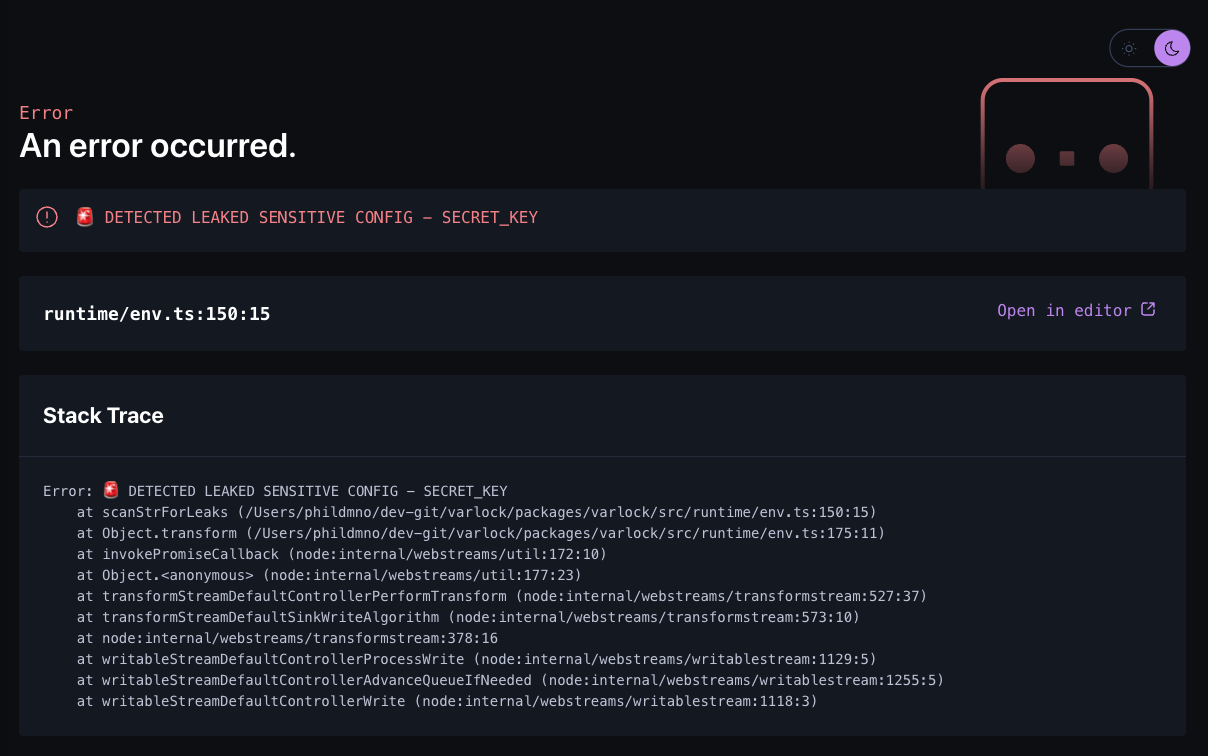 a sample leak detection warning in an Astro project
@encryptInjectedEnv
Section titled “@encryptInjectedEnv”Value type: boolean
Controls whether the injected env blob in server-side build output is encrypted. When enabled, varlock encrypts the blob with AES-256-GCM using the _VARLOCK_ENV_KEY environment variable.
This is primarily relevant for serverless deployments (Vercel, Netlify, etc.) where varlock injects resolved env data into the build output. The blob only appears in server-side code and is generally safe, but encryption provides extra protection, particularly against secrets leaking via sourcemaps.
When enabled, it also applies when varlock run / varlock proxy run spawn a child in blob-only inject mode (--inject blob): the injected blob is encrypted with an ephemeral key carried alongside it (an ambient _VARLOCK_ENV_KEY is reused when present, so nested runs share one key), and resolved values never sit as plaintext in the child’s environment. Since the key rides next to the ciphertext, this protects against accidental leaks (crash reporters, env dumps, logs), not against an attacker who can read the full environment.
Options:
false(default): Blob is injected as plaintext JSONtrue: Blob is encrypted,_VARLOCK_ENV_KEYrequired at build time and runtimeforEnv(...): Conditionally enable based on the current environment
# @encryptInjectedEnv# ---SECRET_KEY= # @sensitive# only encrypt in production# @encryptInjectedEnv=forEnv(prod)# ---SECRET_KEY= # @sensitiveKey management:
- For Cloudflare Workers, the key is auto-generated and uploaded as a secret binding, so no manual setup is needed
- For local dev, the Vite plugin mints a temporary key in an early config hook, so dev runtimes spawned by other plugins (for example Nitro’s worker) inherit it; Cloudflare dev targets fall back to plaintext (see Local development)
- For production deploys to other platforms, you must set
_VARLOCK_ENV_KEYon your platform (see the encrypted deployments guide)
@disableProcessEnvInjection
Section titled “@disableProcessEnvInjection”Value type: boolean
Prevents varlock from injecting resolved values into process.env. When enabled, env vars are only accessible via the ENV proxy; process.env.MY_VAR will not contain varlock-resolved values.
This is useful for security hardening. Combined with @encryptInjectedEnv, it ensures that no plaintext secrets exist in process.env at all.
When set, @generateTsTypes stops augmenting process.env by default (its processEnv option defaults to none), so your generated types match the fact that process.env isn’t populated.
Options:
false(default): Values are injected intoprocess.envas usualtrue: Values are only accessible viaENV
The value must be static (true/false). Because code generation reads this flag, an
environment-dependent value would make generated output differ per environment.
# @disableProcessEnvInjection# ---SECRET_KEY= # @sensitivePUBLIC_URL=@injectUndefinedAsEmpty
Section titled “@injectUndefinedAsEmpty”Value type: boolean
Controls how items that resolve to undefined (for example an optional MY_VAR= with no value set) are injected into process.env.
By default they are left out of process.env entirely, so process.env.MY_VAR === undefined and patterns like process.env.MY_VAR ?? 'fallback' work as expected. This matches the documented value semantics: no value is undefined, while an explicit MY_VAR="" is an empty string, and the two stay distinct all the way through injection.
Most other .env loaders instead set unset vars to an empty string. If you have code that relies on that (for example truthiness checks that expect "", or 'MY_VAR' in process.env), set this decorator to restore that behavior.
Options:
false(default): Items that resolve toundefinedare not injected. This applies to auto-load /initVarlockEnv(),varlock run, andvarlock load --format shell.true: Items that resolve toundefinedare injected as empty strings (""), matching dotenv-style loaders.
The value must be static (true/false). Because code generation reads this flag, an environment-dependent value would make generated output differ per environment.
# @injectUndefinedAsEmpty# ---OPTIONAL_VAR= # @optionalGenerated TypeScript types reflect this: when enabled, the process.env augmentation from @generateTsTypes marks every schema key as always present, since unset items are injected as "". An optional string types as string instead of string | undefined, and literal-typed items keep their unions with "" added (an optional enum(alpha, beta) becomes "alpha" | "beta" | ""). The import.meta.env augmentation keeps its optional keys: frameworks like Vite and Astro only expose prefixed keys through import.meta.env, so a schema key can be absent there regardless of this setting.
Tune the varlock audit code scanner: which directories and keys it skips, and which extra env access patterns it looks for.
@auditIgnorePaths()
Section titled “@auditIgnorePaths()”Arg types: [ ...paths: string[] ]
Excludes directories from the varlock audit code scanner. Can be called multiple times; paths are merged additively.
Useful for excluding generated code, vendored dependencies, or directories that contain env var references you don’t want to audit.
Entries work like .gitignore patterns:
An entry is either a directory name or a path, and it says which by how it starts:
- A bare name matches any directory with that name, wherever it appears.
fixturesskips both./fixturesand./src/deep/fixtures. - A path matches that one directory. It uses the same prefixes as
@import():./or../relative to your project root,~/for your home directory, or an absolute path. Relative entries resolve against the project root even when you narrow a run withvarlock audit ./some/dir, so they keep meaning the same directory../apps/docsleaves adocselsewhere in the tree alone, and./fixturesskips the top-level one but notsrc/deep/fixtures.
Entries name directories, not files. Three mistakes are reported rather than quietly matching nothing: a path written without one of those prefixes (apps/docs tells you to write ./apps/docs), a path that resolves outside the project, and a path that points at a file. A path to a directory that doesn’t exist is fine, since a schema is shared across branches and checkouts; it simply never matches. Trailing separators are ignored, and \ works as a separator so Windows-style entries are fine.
Prefer ./ paths in a committed schema. An absolute or ~/ path is specific to one machine, so it will resolve differently, or outside the project entirely, for your teammates and in CI.
# any directory named fixtures, plus the docs app specifically# @auditIgnorePaths(fixtures, ./apps/docs)# ---API_KEY=# called multiple times, entries are merged# @auditIgnorePaths(fixtures)# @auditIgnorePaths(./generated/config, e2e)# ---API_KEY=These are merged with any --ignore entries passed on the command line, which accept the same forms. .git, node_modules, dist, build, .next, vendor and .venv are always skipped, so they don’t need listing.
@auditIgnoreKeys()
Section titled “@auditIgnoreKeys()”Arg types: [ ...keys: string[] ]
Keys that varlock audit should never report as missing in schema, even when the code scanner finds a reference to them. Can be called multiple times; entries are merged additively.
This is the escape hatch for scanner false positives. The scanner matches patterns over source text and does not parse string literals, so process.env.FOO mentioned inside a help message or a trailing comment counts as a reference to FOO. It also covers keys your code reads on purpose but you don’t want in the schema, such as a well-known variable a library sets.
Entries are exact key names, or simple globs where * matches any run of characters and ? a single one. Matching is case-sensitive.
# @auditIgnoreKeys(FOO, LEGACY_*)# ---API_KEY=To silence the other direction, a declared item that is not referenced in code, use the @auditIgnore item decorator instead.
@auditExtraPatterns()
Section titled “@auditExtraPatterns()”Arg types: [ ...patterns: RegExp[], fileTypes?: string[] ]
Adds project-specific patterns to the varlock audit code scanner. This is the escape hatch for env access idioms the built-in patterns don’t cover (e.g. NestJS configService.get('KEY')). Each pattern is a regex() call; the first capture group is the env key, so patterns without one match nothing. Can be called multiple times; patterns are merged additively.
Anything that is not a regex() call is rejected as an error instead of silently scanning nothing. (A quoted '/.../flags' string is still accepted with a deprecation warning.)
# @auditExtraPatterns(regex('config\.get\(\s*\'([A-Z_]+)\'\)'))# ---API_KEY=A key that isn’t a bare identifier (config.get('app.database.url')) still matches. Commented-out lines are skipped, as they are for the built-in patterns.
Scoping patterns to file types
Section titled “Scoping patterns to file types”By default a pattern is applied to every file the scanner reads, which is every file whose extension it recognizes: .js, .mjs, .cjs, .jsx, .ts, .mts, .cts, .tsx, .vue, .svelte, .astro, .mdx, .py, .go, .rb, .php, .rs, .java, .cs.
Pass fileTypes=[...] to restrict the patterns in that call to certain file extensions. Naming an extension the scanner doesn’t already handle (tf, yaml, sh) also brings those files into the scan, so this is how you cover env references in Terraform, Helm values, CI configs or shell scripts. Extensions are written with or without a leading dot and matched case-insensitively.
# a NestJS idiom, TypeScript only# @auditExtraPatterns(regex('config\.get\(\s*\'([A-Z_]+)\'\)'), fileTypes=[ts, tsx])# terraform and helm, which the scanner would not otherwise read# @auditExtraPatterns(regex('cfg\.get\(\s*"([A-Z_]+)"\)'), fileTypes=[tf, yaml])# no fileTypes: applies to every recognized source file# @auditExtraPatterns(regex('metrics\.inc\("([A-Z_]+)"\)'))# ---API_KEY=Each call is its own scope: fileTypes=[...] applies to the patterns listed alongside it and to nothing else. A pattern with no fileTypes covers the recognized source extensions above, and is not extended to file types another call pulled in, so adding a Terraform rule can’t quietly change what your other rules match.
Files brought in this way have no known language. The built-in patterns are never applied to them, and with no comment syntax to go on, their raw contents are scanned (commented-out lines are not skipped).
Files with no extension at all (Dockerfile, Makefile) can’t be selected this way.
Proxy rules
Section titled “Proxy rules”Rules for varlock proxy, which keeps secrets out of a process by substituting them into outbound requests instead.
@proxyConfig
Section titled “@proxyConfig”Value type: {egress?: "permissive" | "strict", reload?: "off" | "manual" | "auto"}
Configures proxy-wide credential proxy settings. The proxy is driven by @proxy decorators on your items, so this header decorator is optional. It is a single-use, object-value decorator (@proxyConfig={...}), not a function call.
egress controls requests that don’t match any @proxy rule:
permissive(default): unmatched hosts pass through untouched.strict: only requests matching a@proxyrule are allowed; everything else is blocked.
reload controls live hot-reload of the running proxy after a schema edit:
off: no reload; restart the proxy to pick up schema changes.manual: a human applies it by runningvarlock proxy reloadfrom a trusted terminal; a reload requested from inside the proxied agent is refused and logged.auto(default): resolved at launch. Conservative today:manualfor an interactivevarlock proxy start,offfor headless runs or a one-shotvarlock proxy run. It only widens (toward agent-triggered reload behind an approver) when that becomes safe, e.g. inside a sandbox. The--allow-reload/--no-allow-reloadflag overrides it per run.
# @proxyConfig={egress="strict", reload="manual"}# ---# @proxy(domain="api.openai.com")OPENAI_API_KEY=yourPreferredPlugin()See the credential proxy guide for the full workflow.
@proxy()
Section titled “@proxy()”Arg types: (domain: string | string[], path?, method?: string | string[], block?, approval?, keys?: string[], rules?: object[], ...)
Defines a detached credential proxy rule: a domain-level policy (match or block). It injects no secret on its own, but can inject named items via keys=[...], or transform matching requests via transform={..., secretKey=$ITEM_NAME} (the consumed credential is required on a detached rule since there is no attached item to default to, and is always written as a reference; see Request transforms).
This is the header (root) form of the decorator. To inject a specific secret into requests for a domain, put @proxy on the item instead (an attached rule). The two forms share the same options; see the item decorator reference.
# Block a dangerous endpoint regardless of which key would be used:# @proxy(domain="api.stripe.com", path="/v1/refunds/**", method=[POST, DELETE], block=true)# Inject several keys for a host:# @proxy(domain="api.stripe.com", keys=[STRIPE_KEY, WEBHOOK_SECRET])# ---# @sensitiveSTRIPE_KEY=yourPreferredPlugin()# @sensitiveWEBHOOK_SECRET=yourPreferredPlugin()Code generation
Section titled “Code generation”Code-generation decorators turn your schema into generated code, such as TypeScript type declarations or ready-to-use env modules for other languages, and plugins can register generators that emit other kinds of code. See the Code generation guide for the full picture, and Other languages for per-language usage.
Every @generate* decorator below is a root decorator that can be called multiple times (one per output file) and shares these common args:
path: Relative filepath to write the generated file to.auto: Controls whether generation runs automatically on every load (defaults totrue). Set tofalseto generate only when you runvarlock codegenexplicitly, useful in a CI pipeline or a dedicated build step.executeWhenImported: also run this generator when the containing file is imported by another schema (defaults tofalse). It then runs as part of the importing schema’s load, so the output covers the importer’s whole graph, not just this file’s items. See the tip below.filter: Restrict this generated file to a subset of items, using the same selector language as the CLI--filterflag: key names/globs,!negations,@sensitive/@required/@dynamic, and#tagname(set via@tag()). Quote the value if it has more than one comma-separated selector (the decorator parser splits args on unquoted commas), e.g.filter="STRIPE_*,!STRIPE_DEBUG_KEY". Call the same decorator multiple times with differentpath/filterpairs to emit several subset files from one schema.
# only ship billing-tagged keys to the billing package's generated types# @generateTsTypes(path=./billing/env.d.ts, filter=#billing)@generateTsTypes()
Section titled “@generateTsTypes()”TypeScript type declarations. Makes import { ENV } from 'varlock/env' typed and augments process.env / import.meta.env. In addition to the common code-generation args, it accepts:
-
exposeEnv: where the coercedENVobject lives (defaults toglobal).global: globally augmentvarlock/envsoimport { ENV } from 'varlock/env'is typed.local: export a package-local typedENVfrom the generated file (with no global augmentation, sinceprocessEnv/importMetaEnvdefault tononetoo, so nothing merges across packages). Use this in monorepos where multiple packages have different schemas. Requires a.tsoutput path (not.d.ts, since it contains a runtime re-export), and you import from the generated file (e.g.import { ENV } from './env').none: emit only the type definitions, noENVbinding.
-
processEnv: howprocess.envis typed:strict,loose, ornone(defaults tostrict; tononewhenexposeEnv=local, or when@disableProcessEnvInjectionis set, since values aren’t put onprocess.envthen). Note that@types/nodedeclares a base string index signature that can’t be removed, so extra keys remain allowed onprocess.envregardless.It also defaults to
nonewhen another.d.tssitting next to your schema (or next to the generated file) already declaresNodeJS.ProcessEnv. The common case isworker-configuration.d.ts, written bywrangler types. TypeScript merges every declaration of that one interface and requires each shared key to be identical, so two of them can’t coexist: an optional item alone (FOO?: stringvsFOO: string) is enough to fail withTS2320. The generated file names the file that triggered the skip. SetprocessEnv=strictto emit ours anyway. -
importMetaEnv: howimport.meta.envis typed:strict,loose, ornone(defaults tostrict; tononewhenexposeEnv=local). -
icons: embed each item’s@icon(or its data type’s icon) in the generated JSDoc (defaults totrue). Icons for built-in data types and official plugins ship with varlock and those plugins. Custom@iconvalues are fetched fromapi.iconify.designduring generation and are left out if the fetch fails, so with custom icons the output can vary with network access. Seticons=falsewhen the generated file must be identical on every machine, for example when you commit it and check it for drift in CI.
# @generateTsTypes(path=./env.d.ts)# monorepo-friendly: importable local ENV, no globals# @generateTsTypes(path=./env.ts, exposeEnv=local)@generatePythonEnv()
Section titled “@generatePythonEnv()”A self-contained Python module: a lazily loaded ENV object with a documented, typed attribute per item (so editors show item docs on hover), a coerced Env TypedDict with a load_env() that parses the injected env, and a SENSITIVE_KEYS constant. See Python usage.
# @generatePythonEnv(path=./env.py)@generateRustEnv()
Section titled “@generateRustEnv()”A self-contained Rust module: a serde-derived Env struct, a load() function, and a SENSITIVE_KEYS constant. Requires the serde and serde_json crates. See Rust usage.
# @generateRustEnv(path=./src/env.rs)@generateGoEnv()
Section titled “@generateGoEnv()”A self-contained Go package: an Env struct, a Load() function, and a SensitiveKeys map. See Go usage.
# @generateGoEnv(path=./env/env.go)The package name defaults to the output directory (e.g. path=env/env.go → package env); override it with package=.
@generatePhpEnv()
Section titled “@generatePhpEnv()”A self-contained PHP class: a readonly Env with a static load() and a SENSITIVE_KEYS constant. Requires PHP 8.1+. See PHP usage.
# @generatePhpEnv(path=./Env.php)Defaults to a global final class Env. For Composer/PSR-4 projects, set namespace= and/or class= (e.g. @generatePhpEnv(path=src/Env.php, namespace="App\\Config", class=AppEnv)).
@generateJavaEnv()
Section titled “@generateJavaEnv()”A self-contained Java class: a typed Env with a static load() and a SENSITIVE_KEYS constant. Requires Java 17+ and Jackson (jackson-databind) on the classpath. See Java usage.
# @generateJavaEnv(path=./Env.java)Optional package= and class= (default: no package, class Env).
@generateCsharpEnv()
Section titled “@generateCsharpEnv()”A self-contained C# class: a typed Env with a static Load() and a SensitiveKeys set. Requires .NET 6+ (System.Text.Json). See C# usage.
# @generateCsharpEnv(path=./Env.cs)Optional namespace= and class= (default: no namespace, class Env).
@generateTypes() (deprecated)
Section titled “@generateTypes() (deprecated)”Deprecated TypeScript-only alias for @generateTsTypes. @generateTypes(lang=ts, path=...) still works; for other languages use the matching @generate*Env decorator (@generateTypes(lang=py, ...) errors with a pointer to @generatePythonEnv).