
 Blog
Blog


Migration
Loading env vars using Varlock
Section titled “Loading env vars using Varlock”Migration from dotenv (Node.js)
Section titled “Migration from dotenv (Node.js)”In a Node.js app if you are already calling dotenv/config, you can replace it with varlock/auto-load.
import 'dotenv/config';import 'varlock/auto-load';In some cases where dotenv is being called deep under the hood by another dependency, you may instead want to swap it in as a dependency override. See our migrate from dotenv guide for more information.
Within a framework
Section titled “Within a framework”We must replace framework’s existing .env logic with Varlock. Our framework integrations handle most of the work for you. After installation, simply follow the instructions in the relevant integration guide to set up Varlock in your project. Usually this involves adding a new plugin to the existing build system or framework’s config file.
Minimal setup
Section titled “Minimal setup”In some cases, a code-level integration may be challenging or impossible. In this case you can use varlock run to boot your application with env vars injected from Varlock. For example varlock run -- your-app. Sometimes you may need to use this alongside a deeper integration, for example to feed env vars into external tools or additional scripts.
Using varlock/env
Section titled “Using varlock/env”If you’re currently using import.meta.env or process.env, your code will still work after switching to Varlock. However, we recommend using varlock’s ENV object for better type-safety and an improved developer experience.
// Before (import.meta.env) console.log(import.meta.env.SOMEVAR);
// After (ENV)import { ENV } from 'varlock/env'; console.log(ENV.SOMEVAR);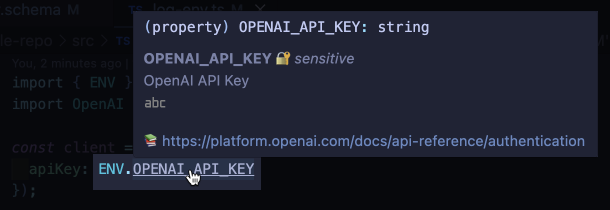
See our integrations section for more information.